 Trippi Steps
Step-by-step guides from your clicks
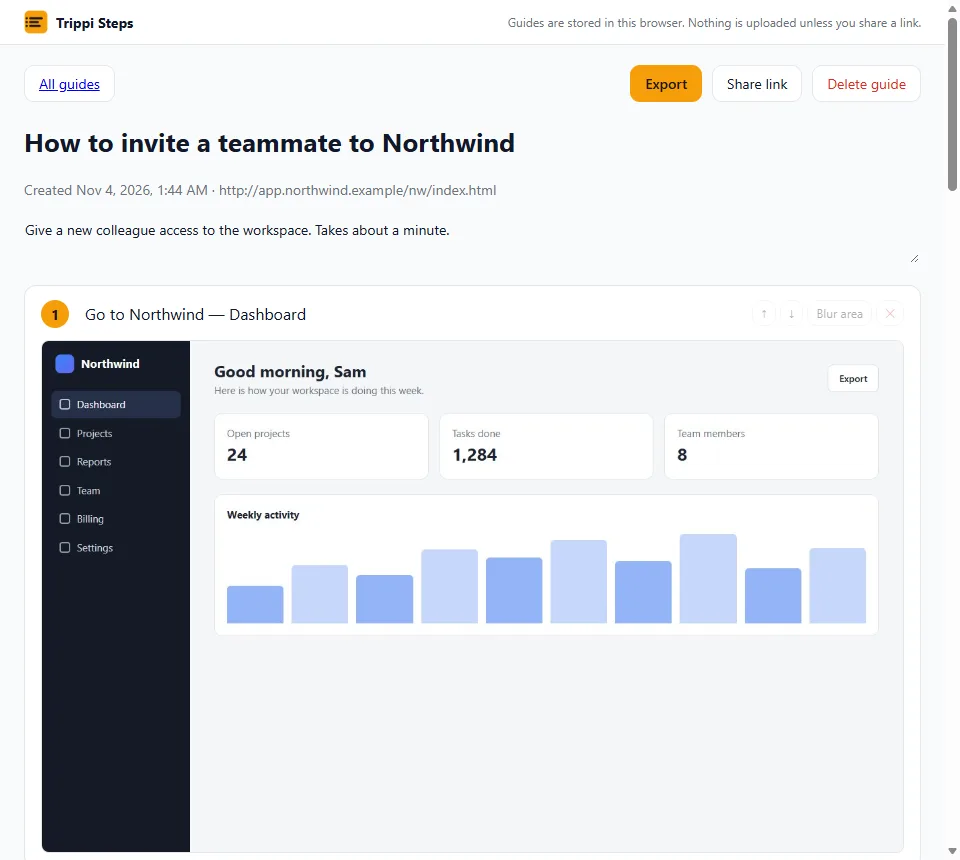
Press Start, do the task once, press Stop. Every click, typed text and page change becomes a numbered step with a screenshot and a plain sentence.
No account to start. Guides stay in your browser.
How it works
- Start. Open the page where the task begins and press Start in the popup, or Alt+Shift+R.
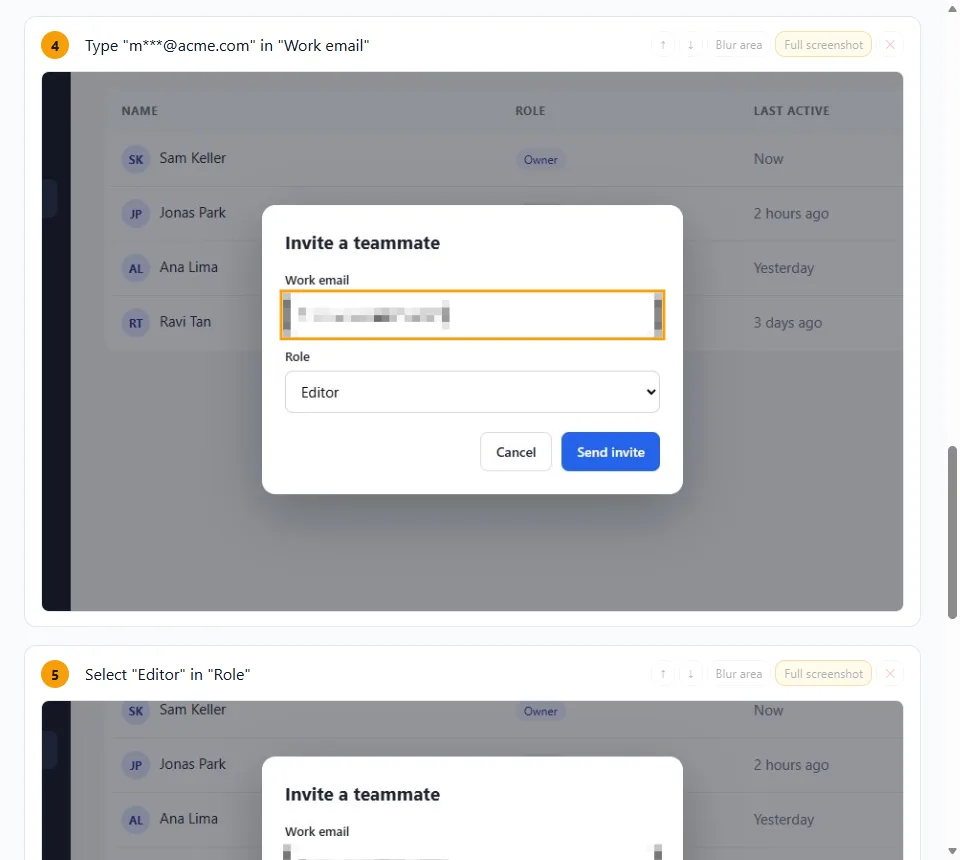
- Do the task as usual. Steps read like "Click Team", "Type in Work email", "Select Editor in Role". The icon counts the steps.
- Stop. The editor opens with your guide. Fix the text, reorder or delete steps, zoom to the click, then export or share.
Edit it like a document
Change the title and any step, add an intro, move steps up or down, delete what you do not need. Each screenshot can be cropped around the click.
Export your way
One HTML file to send, a PDF from the print dialog, or Markdown with images in a zip. You can also copy the guide as rich text and paste it into your docs.
Share a link
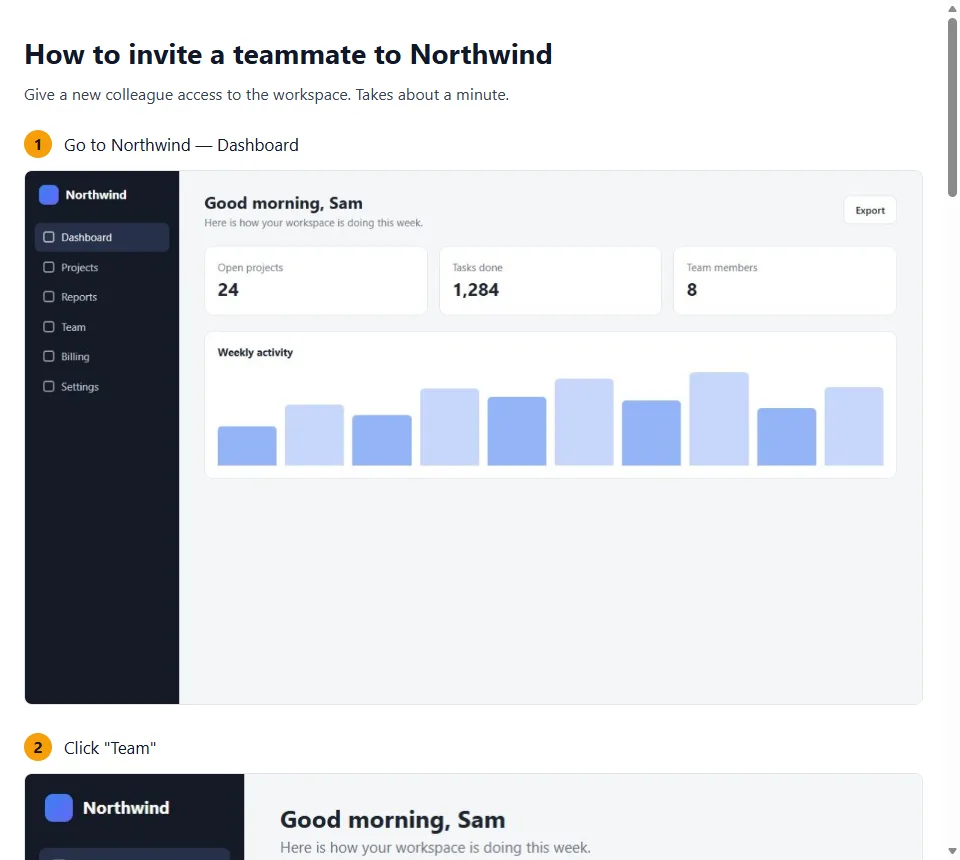
Share gives you a public page that anyone can open without an account. Stop sharing deletes the online copy.
For SOPs, support and onboarding
Write the procedure once, hand it to a new colleague or a customer as a file or a link.
Private data stays out of the guide
Password and card fields are never written into a step and are blurred on every screenshot. A payment frame is blurred as a whole. Email addresses are blurred and shortened in the step text. Anything else you can blur with a drag.
Guides live in your browser. Only a guide you share is uploaded, and only its finished screenshots with the blur already applied. Privacy policy
A link anyone can open
Share uploads the guide and gives you a link. The page works without an account and on a phone. Press Update after you edit the guide, or Stop sharing to delete it from the server.
Questions
Is Trippi Steps free?
Recording, editing and every export are free, and you do not need an account. Shared links are free too, with a limit on how many links can be live at the same time.
Which browsers does it work in?
Chrome and Microsoft Edge on desktop.
What does it record?
Only the tab where you pressed Start, and only until you press Stop. Each click, typed text, choice in a list, checkbox and page change becomes a step. Moving the mouse, hovering and scrolling are not steps.
Are passwords and card numbers safe?
Password and card fields are never written into a step, and they are blurred on every screenshot. Card fields inside a payment frame (Stripe and similar) are blurred as a whole frame. Email addresses are blurred too; you can turn that off in the popup. You can drag to blur anything else.
Where are my guides stored?
In your browser, on this device. Nothing is uploaded unless you press Share. See the privacy policy for what Share sends.
What language are the steps in?
Step texts are written in English for now. You can edit any step.
Are there known limits?
Yes. If you click faster than about twice a second, a screenshot can be taken a moment after the click. Clicks inside frames from other sites (for example an embedded payment form) get a step without a click marker. Changes inside some custom web components are not recorded.
Write the guide once.
Click through it, then hand it over as a file or a link.