 Trippi PageScan
A free screenshot editor, right after the capture
Capture a page, and the editor opens on its own. Point at things, number the steps, hide private data and crop. Then save it. No trial and no watermark.
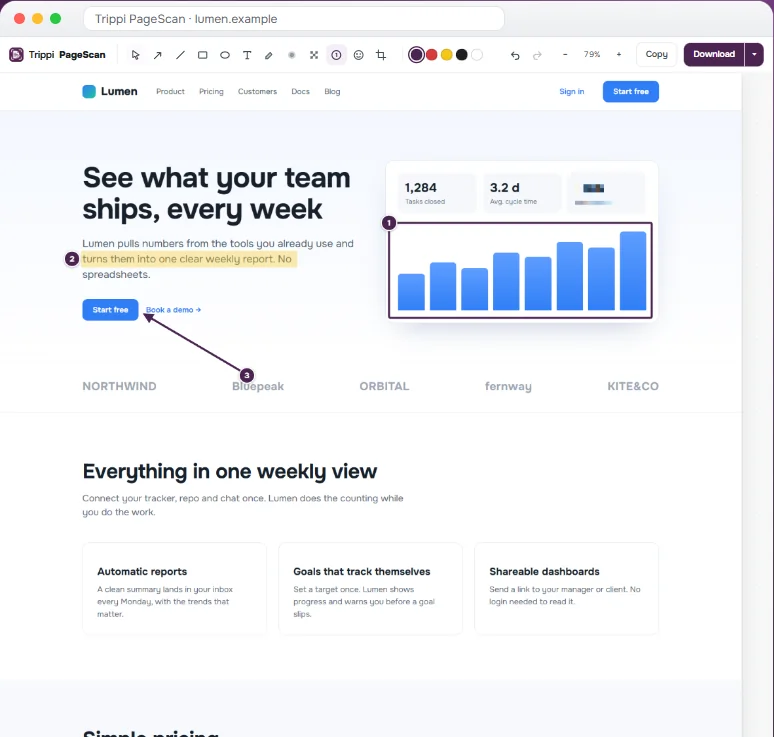
Every tool you need to annotate a screenshot
Arrow and line
Point at the button or the bug. Pick from five colors.
Rectangle and oval
Frame the part that matters, without covering it.
Text
Add a short note right on the image.
Highlighter
Mark a line of text, like a pen on paper.
Numbered steps
Click to drop 1, 2, 3 on the image. Great for how-to guides and bug reports.
Blur and pixelate
Hide emails, names and numbers. How it works.
Crop
Cut the capture down to the part you need.
Emoji
A quick ✅ or ❌ says more than a sentence.
Undo, redo, zoom
Fix mistakes and zoom in on long pages.
Why an editor in the browser
Online screenshot editors ask you to upload the image first. That is a problem when the screenshot shows a client's data, an internal dashboard or your bank. PageScan edits the image inside your browser. The file never goes to a server, ours or anyone else's.
It also saves time: no download, no upload, no second app. You capture, mark up and send in one place.
Save the result
Download as PNG, JPEG, WebP or a multi-page PDF, or copy to the clipboard and paste into Slack, Jira, email or a doc. Which format to choose.
Capture the whole page. Edit it. Free.
No account, no watermark. Nothing leaves your browser.