
Products
Trippi products
Four browser extensions from one team: three for video calls and one for screenshots. Each is installed on its own.

Trippi
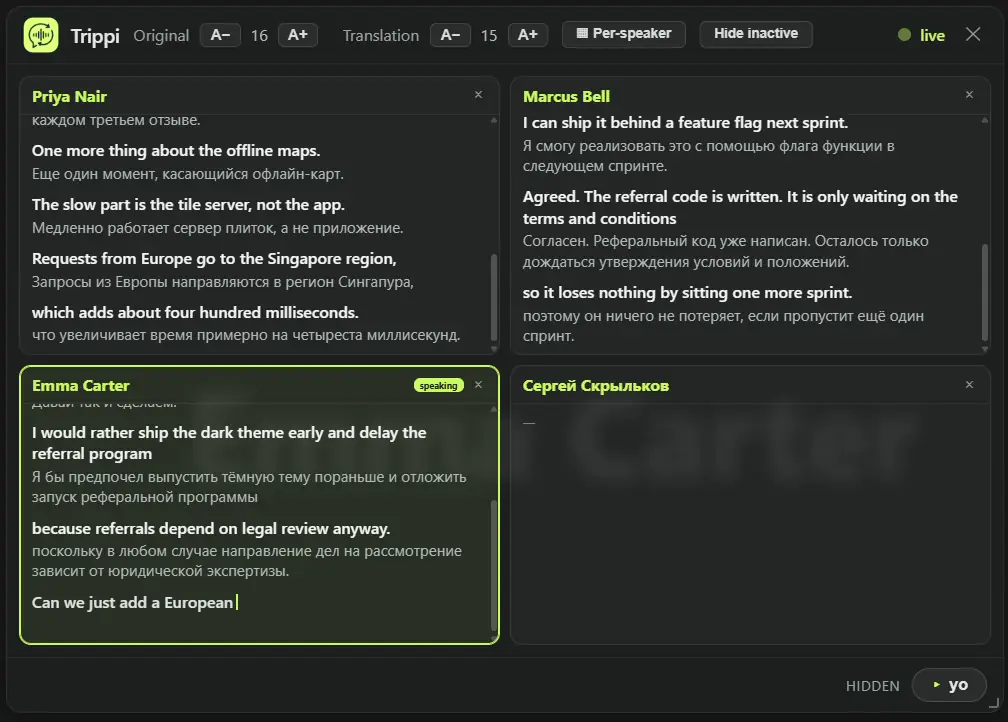
Live meeting translation: real-time subtitles in Google Meet, Zoom and Teams
Trippi is a live translator for online meetings that works inside your browser. Start it in the call tab, pick the language you hear and the language you read, and follow the meeting in your own language while people keep talking.
- Live translation in Google Meet, Zoom (web) and Microsoft Teams (web), on free and personal accounts: no Workspace plan, no Teams Premium
- Any other tab with sound too: Webex, Discord, webinars, online classes, live streams
- Dual subtitles: the original line and its translation together, or the translation alone
- Its own speech recognition instead of the platform’s captions, tuned per language pair; 68 languages in any direction
- After the call: a full transcript with speaker names, bilingual notes and a summary in your language; export as .txt or Markdown
- Captions only you can see: no bot joins the meeting, the audio is never recorded or sold
- Works in
- Google Meet, Zoom and Teams in the browser, and any other tab that plays sound. Browser calls only: not the desktop Zoom or Teams app.
- Price
- Free to start: a monthly allowance with no card and no account. Pro removes the limit.

Trippi Cue
AI interview copilot: suggests answers and translates the call into any language
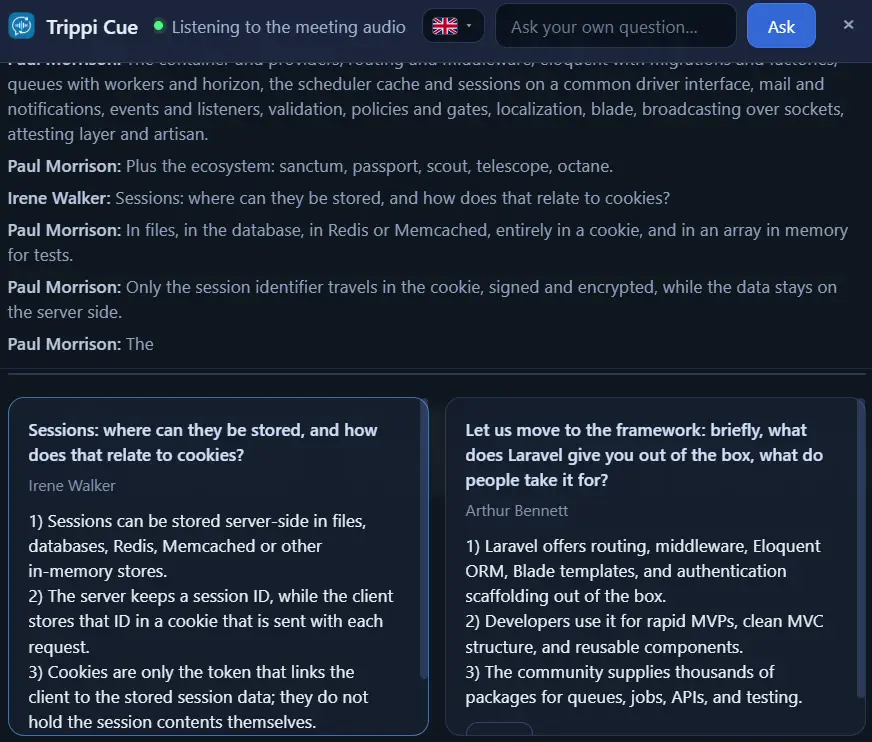
Trippi Cue listens to the conversation in Google Meet, Zoom Web and Microsoft Teams Web, catches the questions and tasks addressed to you, and puts a short suggested answer over the call while the other side is still waiting. Every line can also arrive in your own language.
- Question detection: it knows which participant you are and reacts to what is asked of you, not to every line spoken
- One card per question: the question as it was heard and an answer short enough to read while you keep talking
- “About this meeting”: say what the call is, and the answers stay on that subject
- Ask anything yourself: type a question and the model answers with the last minutes of the call as context
- Live translation built in: every line arrives in your language, the answer is written in the language you pick; 68 languages
- No bot joins the call, nothing is recorded, your microphone is never captured; it starts only on your click
- Works in
- Google Meet, Zoom (web) and Microsoft Teams (web). Browser calls only: not the desktop apps.
- Price
- Free to start; the monthly allowance renews on its own. Paid plans add a monthly pool of listening hours.

Trippi Notes
AI note taker without a bot: live transcript, translation, minutes and tasks
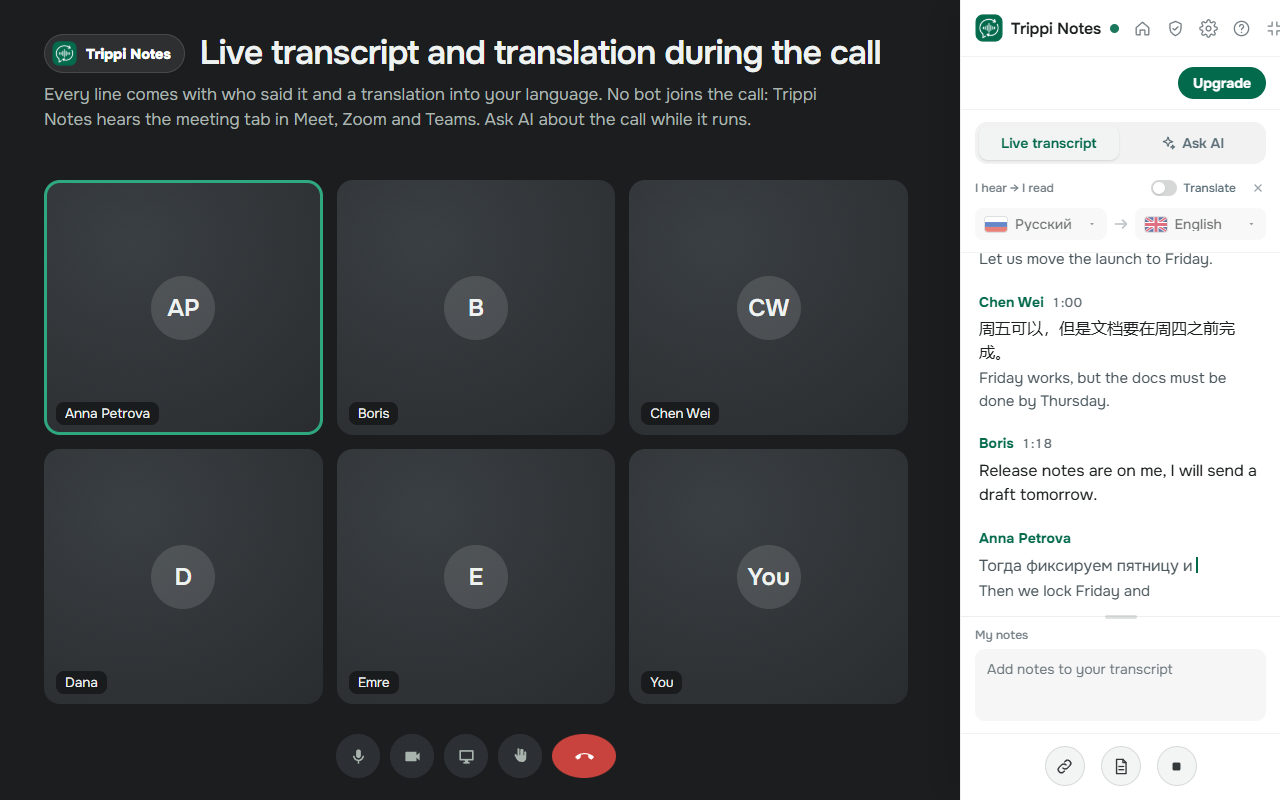
Trippi Notes writes the meeting minutes for you, with no bot in the call. During the call it keeps a live transcript with the name of every speaker and translates it line by line. After the call every meeting lands in one journal: minutes, action items, a follow-up email, and an AI that answers questions about one meeting or about all of them.
- Live transcript with speaker names and the time of every line; your own voice too, once you allow the microphone
- Live translation: every line under the original in your language; the language of the call is recognised on its own
- Meeting summary with decisions, topics and open questions; templates for different kinds of meetings
- Action items with an owner, a status and a due date; send them to your task tracker or calendar
- Follow-up email written from the summary and the accepted action items
- A web journal of all your meetings with search, AI answers across meetings with quotes, export to Markdown or TXT
- Works in
- Google Meet, Zoom and Microsoft Teams in the browser. Works when you are not the host and recording is off. Needs a Trippi account.
- Price
- Free to start. Paid plans Lite, Pro and Power differ in monthly transcription hours; team plans add a shared workspace.

Trippi PageScan
Full page screenshot with a free editor: annotate, blur, crop, save as PNG or PDF
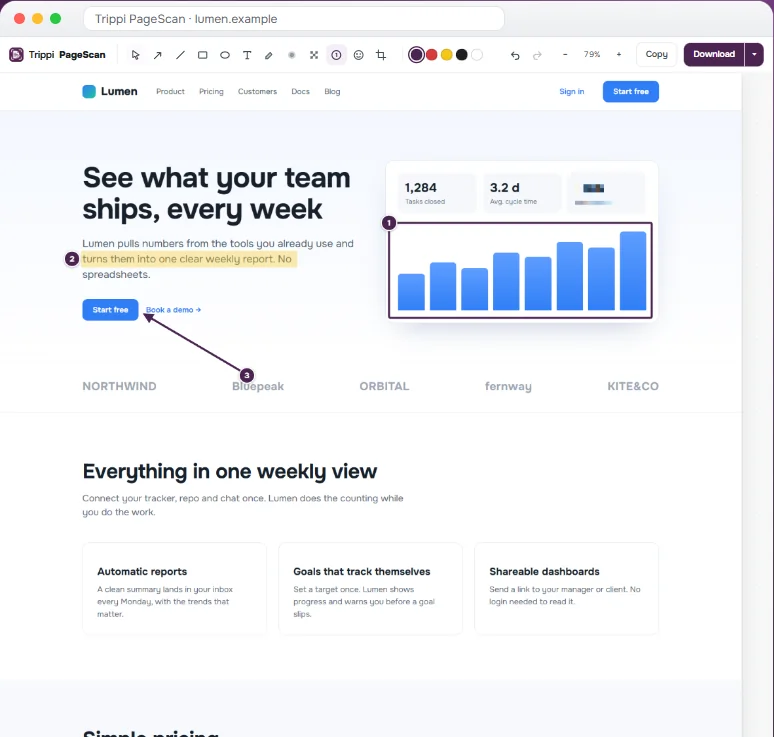
Take a full page screenshot of any webpage in one go, then edit it right away. PageScan scrolls the page for you and stitches it into one long screenshot. No account, no watermark, and the editor is free.
- The entire webpage as one long screenshot: sticky headers show once, lazy images load first, cookie banners do not repeat
- Scrolling screenshot of web apps: if a page scrolls inside a panel, PageScan captures all of it
- Visible part, selected area or a single element; a 3-second delay for menus and hover states
- Editor: arrows, lines, boxes, text, highlighter, numbered steps, blur and pixelate, crop, undo and redo
- Save as PNG, JPG, WebP or a multi-page PDF, or copy straight to the clipboard; history keeps your last 50 screenshots
- Private by design: screenshots stay in your browser, no sign-up, no cloud, no tracking
- Works in
- Any webpage in Chrome or Microsoft Edge. Right-click menu and the keyboard shortcut Alt+Shift+F.
- Price
- Free, including the editor and every export format.
Side by side
The same four in one table.
| Trippi | Trippi Cue | Trippi Notes | Trippi PageScan | |
|---|---|---|---|---|
| What it does | Live translated subtitles over a meeting | Suggested answers during a job interview, with live translation | Live transcript, minutes, action items, follow-up email | Full page screenshot with an editor |
| Works in | Meet, Zoom and Teams on the web, Webex, Discord, any tab with sound | Meet, Zoom and Teams on the web | Meet, Zoom and Teams on the web | Any webpage in Chrome or Edge |
| Languages | 68 | 68 | 60+ | Not applicable |
| Joins the call? | No | No | No | There is no call |
| What it keeps | Audio is not stored. The transcript stays in your browser. | Nothing is recorded. Session text is kept for 30 days. | No audio or video. The text archive is kept for as long as you choose. | Nothing leaves the browser. The last 50 screenshots stay on your device. |
| Price | Free to start, Pro removes the limit | Free to start, paid plans add hours | Free to start, paid plans add hours | Free |
| Get it | Chrome Web Store Edge Add-ons | Chrome Web Store Edge Add-ons | Chrome Web Store Edge Add-ons | Chrome Web Store |
Prices depend on your country. Each product’s pricing page shows the price for yours.