



Notes, summaries, tasks, emails and AI answers for all your meetings, in one journal
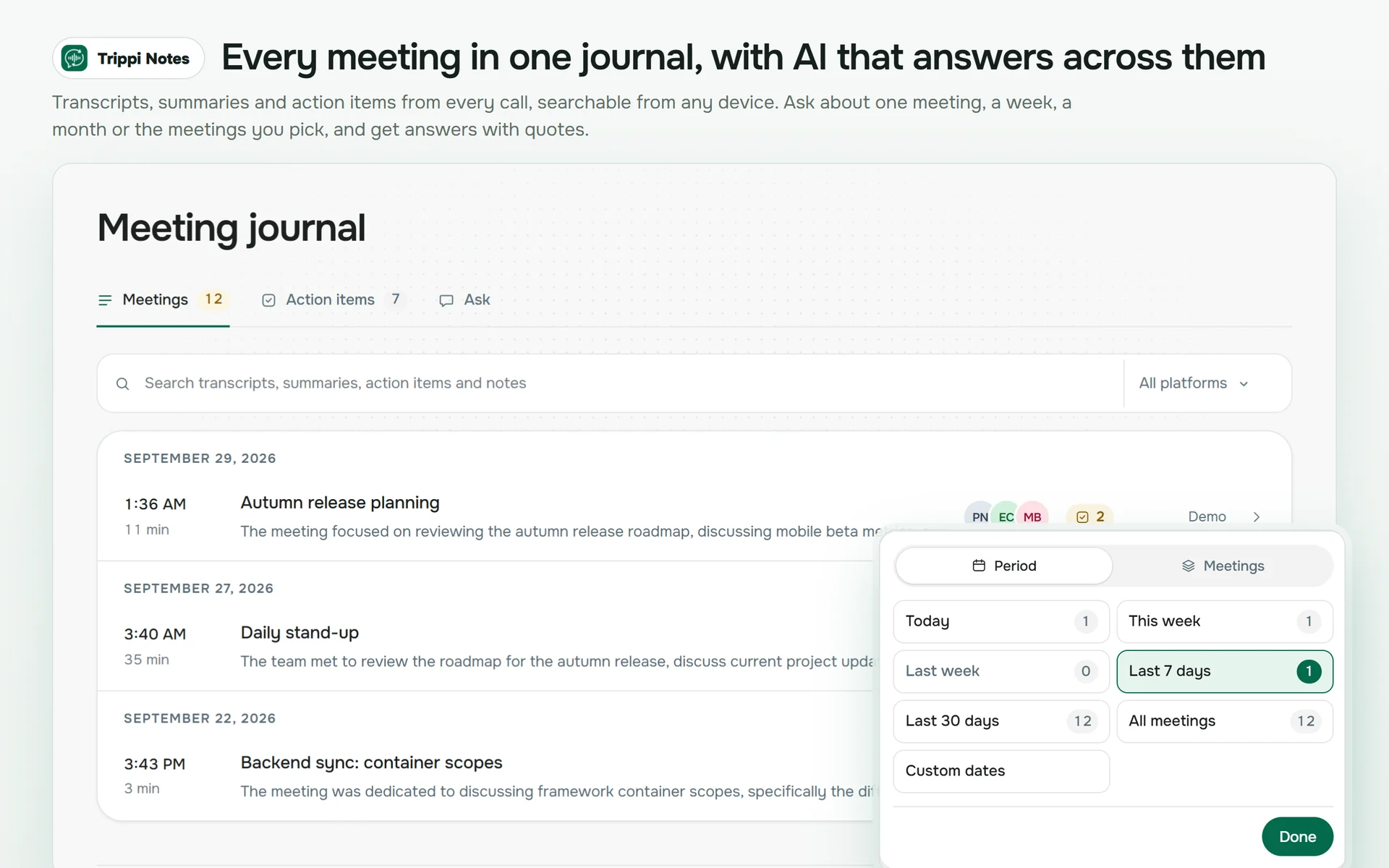
- Ask the AI about your week: what was decided and which problems came up in more than one call
- Lead a team? On a team plan, read the summaries of calls opened to the team and see who had how many meetings
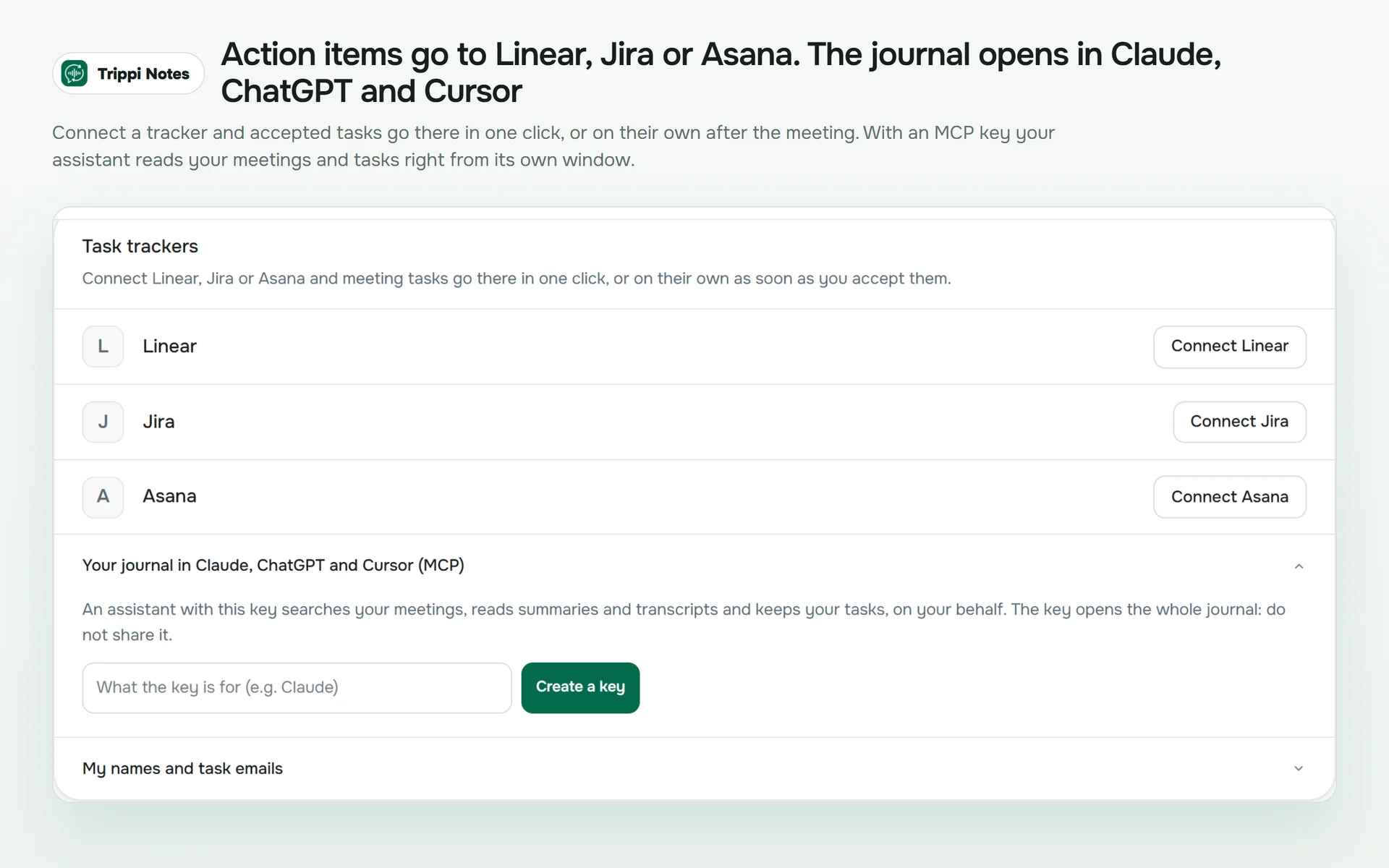
- Tasks go to Jira, Linear or Asana with owners and due dates, once you accept them
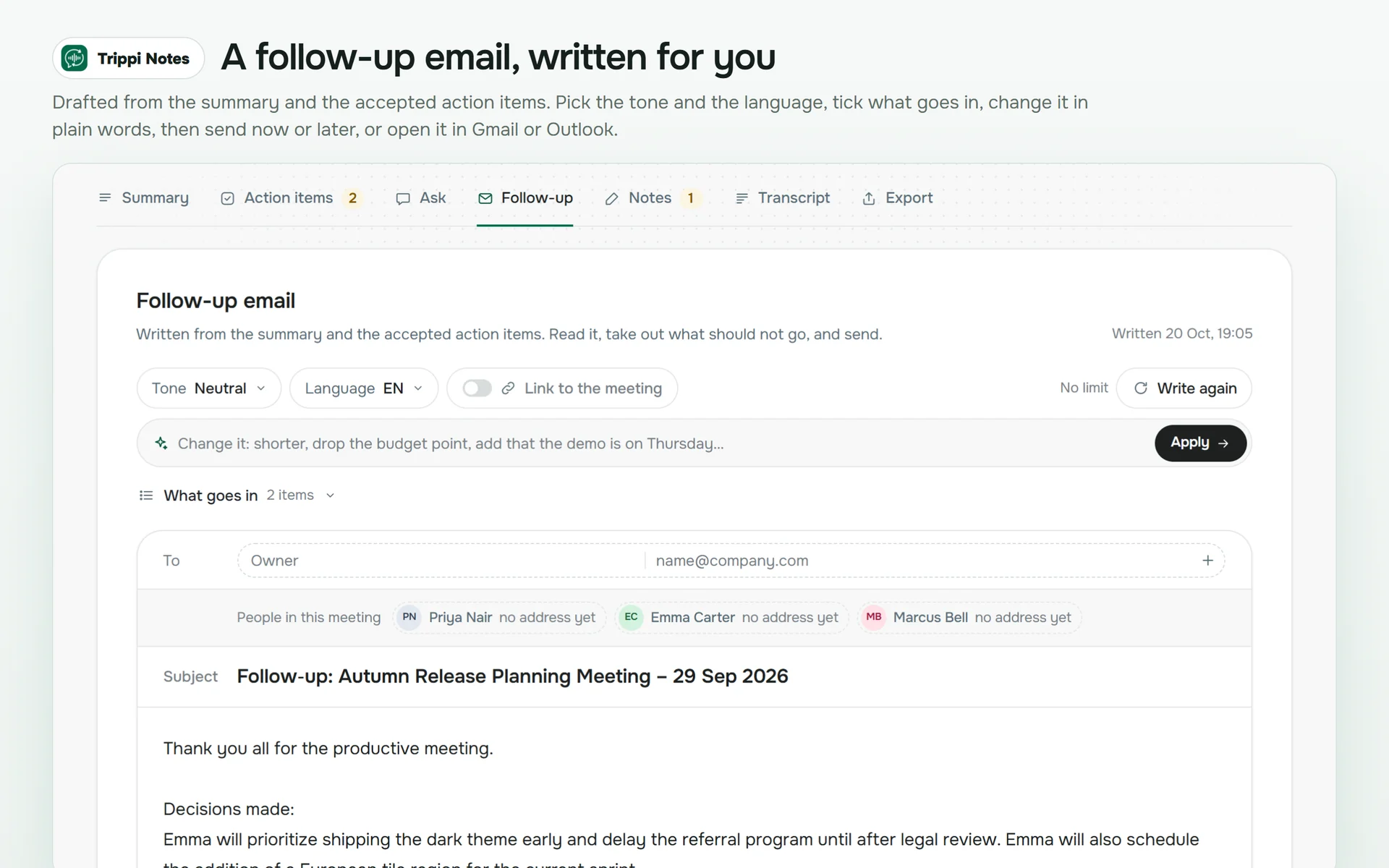
- The follow-up email is drafted when the call ends, or sent on its own
- One list of open tasks from every meeting, with a reminder before the due date
Chrome extension · no bot in the call · works right after install
How it works
From a call to finished minutes in three steps
You do not invite a bot or upload a recording afterwards. Trippi Notes writes the call down in your own tab while it runs.
Click the icon in the call
Open the meeting in your browser and click the Trippi Notes icon. Chrome lets an extension hear a tab only after this click, so nothing starts without you.
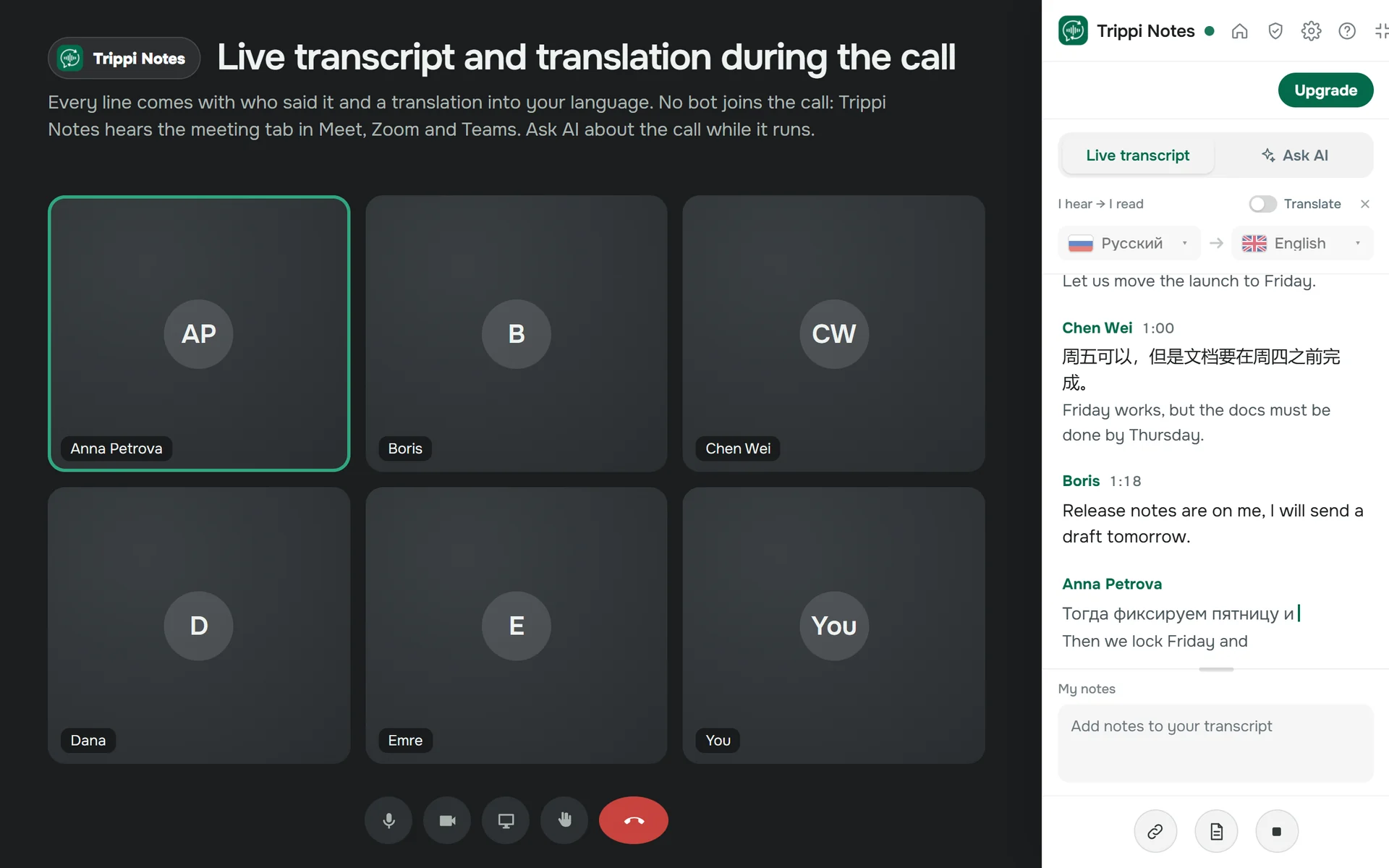
Follow the live transcript
A panel opens at the side of the tab. It writes down what each person says, with their name and the time, and can add a translation under each line.
Get the minutes
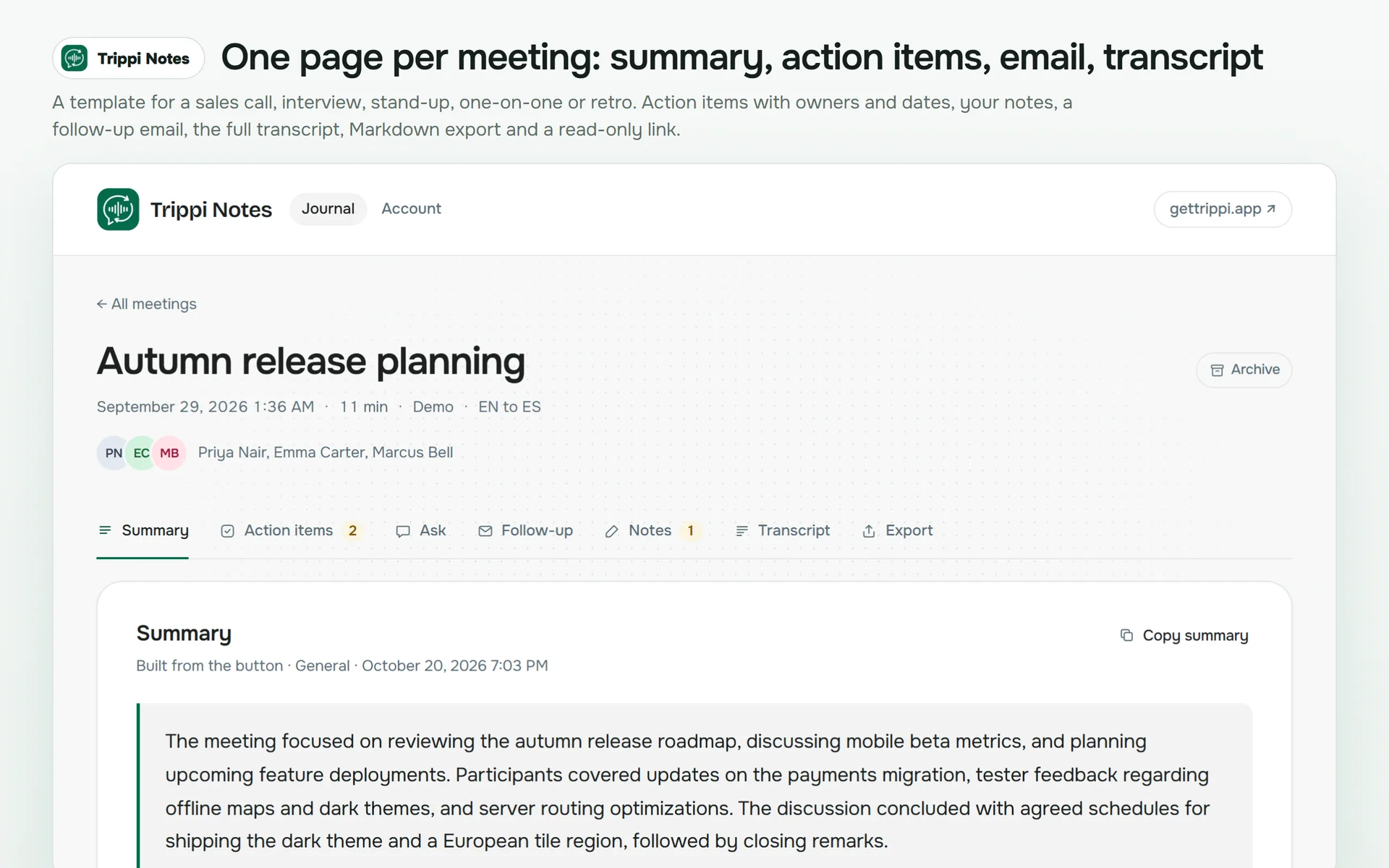
When the call ends, press Summarize to get an overview, the decisions, tasks with owners and open questions. The meeting is saved in your journal.
What people use it for
Common tasks, each with its own guide
Each guide shows how to do the task by hand first, and then how Trippi Notes does it for you.
A Teams transcript when you are not the organizer →
Teams lets the organizer download it. Here is the way for everyone else.
Minutes in English from a call in another language →
The call is in Spanish, German or Japanese, and the minutes are in plain English.
Meeting notes without a bot in the call →
No extra participant to let in, and nothing for the host to block.
A follow-up email right after the call →
Six examples to copy, or a draft written from the meeting itself.
Ask ChatGPT or Claude about your meetings →
Prompts that work, and a way to connect your meeting journal to Claude.
Meeting minutes templates →
Minutes, 1:1, stand-up, sales call, user interview and more.
Your language
Minutes in your language, whatever language the call was in
Trippi Notes recognizes 68 languages. Under each line of the transcript it can add a translation into your language, and the summary is written in the language you read. If people switch languages during the call, the transcript follows them.
Said in the call
“Wir verschieben den Start auf den dritten Oktober.”
The same line, in your language
“We are moving the launch to October 3rd.”
In the summary
Decision: the launch moves to October 3. Task: Anna sends the copy to Jonas tomorrow.
An illustration of the two lines, not a screenshot.
After the call
What you get after every call
Besides the full transcript, you get what people usually look for in a meeting: the decisions, the tasks with owners, and the questions that are still open.
Transcript
Every line with the speaker’s name and the time it was said. Your own notes are saved next to it.
Summary
An overview, the decisions, open questions and a short glossary. Templates for a sales call, an interview, a stand-up, a one-on-one, a retro and a customer interview.
Action items
Tasks as a checklist with the owner and the date, and one list of open items from all your meetings.
Ask AI
Ask what was decided or who took which task. The answer comes with quotes, and a click on a quote jumps to that moment.
Journal and search
All your meetings in one list, with search by words, names and decisions.
Follow-up email and export
A follow-up email drafted from the summary, export to Markdown or plain text, or the whole meeting opened in ChatGPT or Claude.
No bot, and your data
No bot in the call, no audio recording
Trippi Notes does not join the meeting as a participant and does not save audio. The sound goes to the speech recognition service, and only the text is kept.
No bot joins
It works in your own tab. The other people see the call exactly as before.
No recording
Audio is turned into text as it plays and is not saved, by us or by the extension.
Notes stay yours
Your meetings journal follows you to any computer you sign in on. You choose how long meetings are kept, and you can turn it off or delete everything at any time.
Platforms
Works in Google Meet, Zoom and Teams
Browser calls in Chrome and other Chromium browsers. Google Meet needs nothing at all; Zoom and Teams on the web ask for the site once, the first time.

Google Meet
Works out of the box

Zoom
In the browser

Microsoft Teams
In the browser, full and light client
The desktop Zoom and Teams apps are not a browser tab, so an extension cannot hear them. Open the same meeting in the browser instead.
Pricing
Start free, then choose a plan by hours of meetings
Every paid plan has summaries, AI answers, follow-up emails and questions about all your meetings. The plans differ in how many hours of meetings they write down and how many AI requests you get each month.
Free
To try it on your own meetings.
$0/month
A monthly allowance that renews on its own
- ✓ Transcript with names and times
- ✓ Translation in 68 languages
- ✓ Meetings journal with search
- ✓ A few summaries and AI answers each month
Lite
For a few calls a week.
$6/month
or $60 a year
10 hours of meetings a month
100 AI requests a month
- ✓ Summaries, AI answers and follow-up emails
- ✓ Questions about all your meetings at once
- ✓ Summary templates and your own request
- ✓ Your meetings journal on any computer
Pro
For people with meetings every day.
$12/month
or $120 a year
25 hours of meetings a month
300 AI requests a month
- ✓ Summaries, AI answers and follow-up emails
- ✓ Questions about all your meetings at once
- ✓ Summary templates and your own request
- ✓ Your meetings journal on any computer
Power
For days full of calls.
$24/month
or $240 a year
70 hours of meetings a month
1000 AI requests a month
- ✓ Summaries, AI answers and follow-up emails
- ✓ Questions about all your meetings at once
- ✓ Summary templates and your own request
- ✓ Your meetings journal on any computer
A plan belongs to your account. Paddle takes the payment as the merchant of record; no card details are entered on this site.
Plans for teams
Team plans: one pool of hours for the whole team
Five people on personal Pro is $60 a month for 125 hours in five pools that never mix. Team S is $49 for 120 hours in one pool, spent by whoever has the meetings. Fifteen people on Pro is $180; Team M is $99.
Who does not need it
For two or three people, personal plans are cheaper. The same goes for a team that together uses much less than the pool. A team plan starts to pay off at about five people.
One shared pool of hours
The hours are bought once for the whole team and spent by whoever has the meetings. Nobody’s unused hours run out in their own account.
Invite by link or by email
Each person signs in with their own account and keeps their own journal. The owner sees who is on the team and how many meetings and hours each person had in the last 30 days.
Meetings opened to the team
Open all your meetings to the team with one setting, give one colleague access, or add a meeting to a shared space. This works for meetings kept in your archive, and a meeting you mark private stays closed to the team.
Shared spaces
Folders of meetings the whole team can open: one for a client, a project or a hiring round.
Comments
Leave a comment on a colleague’s meeting or on one line of its transcript.
Shared AI prompts
Save a prompt for the AI chats once and share it with the team. Only its author can delete it.
Team S
Up to 5 people
$49/month
120 hours of meetings a month in one shared pool
300 AI requests per person a month
Buy Team STeam M
Up to 15 people
$99/month
250 hours of meetings a month in one shared pool
300 AI requests per person a month
Buy Team MTeam L
Up to 40 people
$199/month
500 hours of meetings a month in one shared pool
300 AI requests per person a month
Buy Team LYou can pay without an account: it is created from the email on the payment form. Paid by card through Paddle, with a receipt for every charge. Need a company invoice or a VAT number on it? Write to [email protected] before you pay.
FAQ
Frequently asked questions
Does a bot join my meeting?+
No. Trippi Notes works inside your browser tab. Nobody new appears in the participant list, and the other people see nothing that was not there before.
Which calls does it work in?+
Google Meet, Zoom in the browser and Microsoft Teams in the browser, in Chrome and other Chromium browsers on a computer. The desktop Zoom and Teams apps run outside a browser tab, and an extension cannot reach them.
Can the notes be in a different language from the meeting?+
Yes, that is the point of it. It hears 68 languages, finds the language of the call by itself, and writes the translation and the summary in the language you read. A call where people switch between two languages works too.
Is the meeting recorded?+
No audio or video is recorded or kept. The sound goes to the speech service to become text, and the text is kept in your browser and, when you are signed in, in your meeting journal on our server, so you can open and search it from any computer. You can turn that off and delete it at any time.
Do I need an account?+
No, you can start without one. An account is for the paid plans, for the meetings journal on any computer and for the email with the transcript after a call.
What counts as an AI request?+
A meeting summary, a question about one meeting and a follow-up email are one request each. A question about all your meetings at once is three. You can see how many are left in your account and in the extension popup, and the count starts again on the 1st of each month. To keep the service fair for everyone, one day can use up to a quarter of the month.
Is there a plan for a team?+
Yes: Team S, Team M and Team L, one shared pool of hours for up to 5, 15 or 40 people, with meetings you can open to the team, shared spaces and comments. For two or three people, personal plans are cheaper. Prices and the comparison are in the Plans for teams part of this page.
Do I need to be the host?+
No. It hears what your browser tab plays, so it works when you are a guest too. Tell people you are taking notes, as you would with a pen.
Is this the same as Trippi?+
No, it is a separate extension from the same team. Trippi puts translated captions over a call. Trippi Notes writes the meeting down and gives you the summary and the tasks.
Honest limits
Limitations
What Trippi Notes does not do, so you know it before your first call.
Browser calls only
The desktop Zoom and Teams apps live outside a browser tab, and no extension can reach them. There is no phone version: mobile browsers do not run extensions like this.
Starts only with your click
Chrome gives an extension the sound of a tab only after you click its icon. It cannot be switched on for you.
Speech only, not the screen
It does not see slides, shared documents or the meeting chat. It works only from what is said out loud.
The summary is written by AI
Read it before you send it on. It can miss a point or get a name wrong. The glossary helps with names and product terms.
Notes, tasks and emails from all your meetings in one place
Install Trippi Notes from the Chrome Web Store and click its icon in your next call.